See also :
Saturday, September 15, 2012
PLM Migration : Part 2
See also :
Sunday, September 9, 2012
PLM Migration : Part 1
- Movement of specific data to new system based on certain criteria. Ex Group wise, project wise, workflow based etc.
- Set of users switch over the time.
- Co-existence of old and new system for some duration (From months to a year or so).
Bulk Migration
|
Phase Migration
|
Lower overall costs
|
Overall Higher Cost as two system required to maintain
|
No synchronization required between multiple legacy and new system
|
Synchronization required between old and new system
|
Change Management and Training challenge is high.
|
Better Change and Training Management due to Phase wise migration
|
High impact in case of Migration failure.
|
Roll back can be easily done as old system coexist with new system
|
Suitable for Simple to Medium Complex Data. Also simple CAD with few BOM Line and depth
|
Suitable for Complex data mode and huge CAD assembly.
|
Custom Migration Approach
|
Third Party Tool Migration
|
Higher Upfront Cost
|
Only License cost involved
|
Suitable for Multi System Complete Migration
|
Suitable for simple migration supported tool
|
Regressive testing required
|
Limited testing required as it certified by provider.
|
Flexibility in case change in Business cases
|
Can be costly and time consuming if the Tool doesn’t support those use cases
|
See also :
PLM Migration : Part 2
Thursday, August 30, 2012
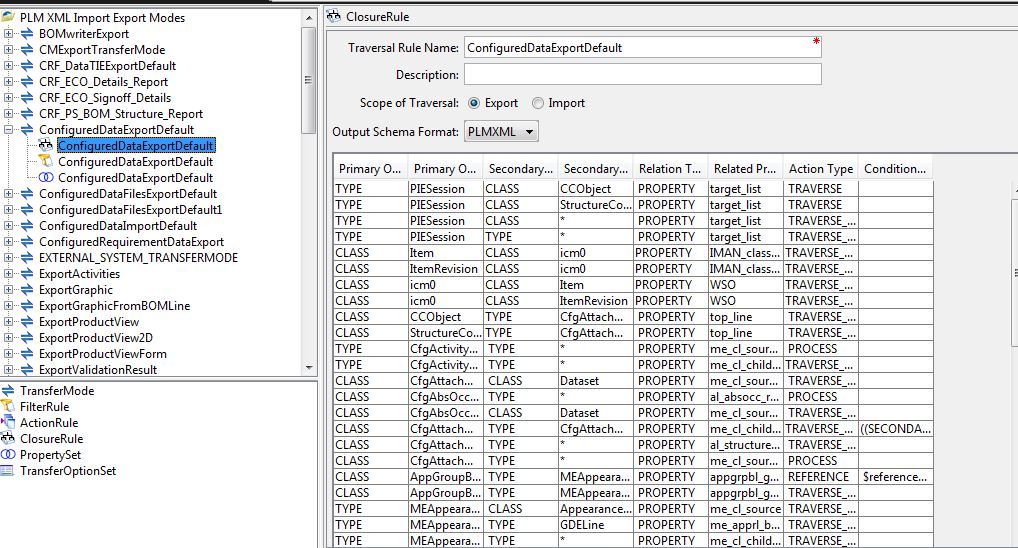
Basic of PLMXML Export/Import
So for example if we required to extract the description property of Item Revision, it required to be defined as shown in below figure
Sunday, November 20, 2011
Approach for Successfull PLM Implementation in a Enterprise
PLM implementation is a complex system integration which not only involved technology implementation but also process streamlining and organization change. More often than not the PLM system fails to fulfill its promise not due to technology limitation but failure by organization on process and change management. In this blog I will try to explore various reason of failure due to inability of Enterprise to do good Change Management and approach to overcome this limitation for successfull PLM implementation.
Organization Change Management
Adaptation of PLM in any enterprise usually starts with big fun fare and expectation. But down the lane people realize that technology implementation is only one aspect of it. The other aspect is related to process and Change Management within the organization. For example there is a big giant company which has spent hundreds of millions of dollar on PLM system, but still struggle to stream line the part management and retire there old legacy system. The part of problem lies on the approach the company usually takes for PLM and part lies on the Vendor whose product they implement. The company usually starts approaching PLM purely from IT perspective rather than core business process management. Hence it results in PLM system selection purely on technology and functional richness, rather than its adaptation and suitability to the company. Since PLM looks from IT perspective, it also lead to internal team selection from IT department only. Where as it should be mix of business and IT people.
PLM Vendor Selection
PLM vendor ]are more interested in selling their product rather than providing business solution to the client. This makes them to blend the actual business process issue of the client to suit their product offering. This always led to less user level adaptability once the PLM is implemented and extra millions dollar by enterprise to make in adaptable by heavily customization which earlier avoided due to vendor promise of configuration rich product. Also PLM vendor are usually not good in Organization Change Management which usually a key attribute for PLM successful adaptation in any Enterprise.
Enterprise PLM Vision
The other aspect which usually define failure or sucess of PLM is managing future implementation and changes . Usually PLM started in any Organization with good long term vision. But as time goes, the vision goes on back seat and focus shift from strategy to providing immediate solution to user problem and requirement. This usually makes PLM system more complicate and less agile in long run. This change of track can be seen most of time in big organization and the reason can be many. One of the reasons is lack of any PLM strategy management team which basically should define and track long term goal of company. Second mainly in big enterprise is that in many cases there are independent powerful businesses vertical which want drive the change in PLM system based on their narrow vision and requirement rather than looking at broader vision and strategy on enterprise. This lead to deviation from vision defined in early stage of PLM implementation. Hence the best approach is to have PLM strategic team having from Top Management of different business unit which monitor the progress in a specific time interval. Any deviation from vision should be approved by this strategic team.
Summary
Below finer points summarize the above discussion.
1) Looking PLM purely from IT perspective is a mistake. Always look PLM from Buisness process perpective rather than information management tool.
2) Internal PLM implementation of a company should have both from IT and business user.
3) PLM system evaluation should be purely done from organization requirement and long term vision rather than feature offering of PLM Vendors.
4) Strict validation of Vendor product offering should be done against business requirement.
5) Organization Change Management is most important but often ignored aspect in PLM. It is recommended to have strong change management team. Prefer to engage external professional with dominant experience organization change management.
This is my view on it. Please open to provide your view and comments.
Saturday, November 12, 2011
PLM in a Cloud : Limitation and Approach
For last couple of years we are lot of buzz is created regarding cloud computing and its promised benefits. Still required to be seen its benefit as word are going around as Enterprise are still struggling to get best way to approach it. As with other domain in IT, PLM in a cloud is also hot topic around in PLM world. Well lot of noise about its obvious benefits and cost saving, but there is basic different on PLM to other areas. In this blog I will discuss this limitation and some architect approach to implement PLM in cloud.
PLM Cloud Limitation:
When we talk about PLM, it not just includes information stored in byte as Meta data somewhere in database. It is much more than just discrete Meta data. It include product information which can be Big CAD geometric file which can in hundred of MB or can be some excel information storing some patented engineering information. Also all this complex data files are associated through relation provided by different PLM tools. So making these diverged files available in cloud itself is a big challenge. Secondly PLM is usually fully implemented by mid size to big corporation whose main objective is to stream line product development and safe guard know how rather than cost saving on this critical IT piece. So looking at the above aspect probably full offering of PLM in cloud will not be a good idea. To summarize this are the limitation of PLM in a cloud.
- PLM is not just about metadata. The major chunk is vault or file management. Managing this files which can be as big as some hundred MB is difficult.
- Company will be reluctant to have their core product knowledge information in cloud.
- PLM is cluster of different tool which make the overall PLM system in any organization. This cluster of tool can be varied from Enterprise to Enterprise. Offering homogenous PLM tool in a cloud can’t solve the problem.
- Full implementation of PLM is usually done by mid to large size enterprises with deep pocket. Cost saving can’t be only reason to move to cloud.
Having said that, still there is scope of implementing PLM in cloud with some clever architect and defining it scope. For example vendor collaboration can be done through Cloud so that they don’t required to access you core PLM system or network. I am proposing some PLM cloud architect which can come some of limitation.
PLM in a Cloud Architect proposal :
Option 1 : Vault in local environment and PLM in a cloud :
This can solve the problem of transferring data from cloud to local environment. For example CAD data which can Mega bytes. Also Company will feel more secure as their core product information lies with in Enterprise Network.
Option 2 : Partial PLM in a Cloud for Collaboration :
This can be effective use for vendor collaboration as well for multi site environment. This will help the enterprise to define access in a better way
Conclusion: Although Cloud computing is a promising technology, but looking from PLM it has some limitation as discussed in the blog. But still if we apply right approach on implementing it rather than going with full PLM in a cloud, enterprise can still leverage advantage of cloud. I discuss two conceptual approaches for it. I am sure there will many other approaches for it. I welcome all to comment and discuss on this topic.
Saturday, November 5, 2011
PLM Implementation : Design for Support
What we mean by design to support? In sort it mean design should be done in such a way that all unexpected cases can be handled appropriately and propagated to relevant system so that proper action can be taken. One question arises how it is different from error handling? There is quite different between generic error handling and exception handling due to environment instability. Example of generic error handling is string size to large short of thing. Exception handling for support usually required corrective action from admin or support person.
Support Consideration during Design:
While Designing the PLM system it is important to list down all exception which will require corrective action from support. Ideally a Design review should be done with Support team before signoff. But it is rarely done in new PLM implementation project as implementation is done by one vendor and support activity is done by other vendor. So coordination and making them in sync is always a challenge. Based on my experience following point should be considering from support perspective while designing the PLM system.
Design for Support Consideration and Approach
1) Define or discover present support strategy of Organization.
2) Find out the tools presently use by Organization of Infrastructure management. For example some Enterprises use standard tool like System Center Operations Manager (SCOM) which also monitor health of application in remote system. Understand the infrastructure management tool so that PLM system can be integrated with it.
3) List all exception for all Business cases where user can required help of support.
4) Categorize each exception based on priority. Here a Business analyst can be consulted.
5) Define appropriate message for each exception.
6) Define and document appropriate corrective action for each exception.
7) Design PLM Implementation to accommodate this Exception cases and required appropriate exception output from PLM system so that it can be handle by Infrastructure management tool.
8) Have an approval from all stake holder mainly from support team who is going to own the support activity.
Design for Support is important aspect for PLM implementation but rarely given much consideration. If due consideration is given during design stage will help to reduce the support resolution time and also can save considerable amount of cost for a organization in long run.
Sunday, October 23, 2011
Configuration Based PLM Implementation
Configuration Driven Implementation:
Configuration driven implementation can be define as development which can incorporate future change of requirement through change in some property or attribute define in a system. Basically it can be said that change can be done without changing the code. So configuration driven implantation laid its foundation at requirement itself, as the constraint of requirement define how much configuration approach can be taken. If the requirement is too specific and unique than configuration approach may be not a good idea. But if requirement is generic enough that configuration driven approach can be taken. For example if requirement presently is to process some logic for specific part type only but it future other part type can also have same business process. Also while doing design of configuration approach it should also be taken in to account whether there is any possibility of change in requirement. For example rarely any Organization changes there Change Management process once develop. Making this solution, too much configuration based may not be sound approach. Also other factor is reusability, usually for example Workflow Handler can be written in such a way that it driven by argument and can be reusable for similar case but with different business object type and status. To summarize this are the three factor which define for going for Configuration approach.
1) Requirement is generic or too specific.
2) Expected change in future.
3) Reusability of implementation.
Configuration based approach in Teamcenter:
In teamcenter you can drive configuration based approach through various means. The main tool which is also use in Product provided Configuration is Preferences. Preferences are internal Teamcenter environment variables store in database. Teamcenter provide various API both at server and client side to access those preferences. One of the advantages of preference based approach is that Teamcenter provide different level of preference control based on Site, Group, role and use. Also access control for edit for preferences is also defined. Hence different configuration can be wisely used . Second approach usually is through Configuration file. We define set of property in specific format which is read by code during runtime. The config file usually help in specific location usually in tcdata directory. This approach has its limitation as specific code to be developed to read and understand the config file. Also it not store in Teamcenter environment. Third approach is used for Workflow Handler development which can be configured by providing argument and its value while designing the Workflow. This approach widely used for making Handler behavior generic enough to be driven by argument. For example Handler can check state of target object type. The object type can be defined in argument.
To summarize different approach Configuration driven implementation in Teamcenter usually can be categorize in three types.
1) Preference based approach.
2) Configuration File based approach.
3) Argument based approach.
Usually implementation is driven by mixed of the above, but most prefer way should be preference based approach.